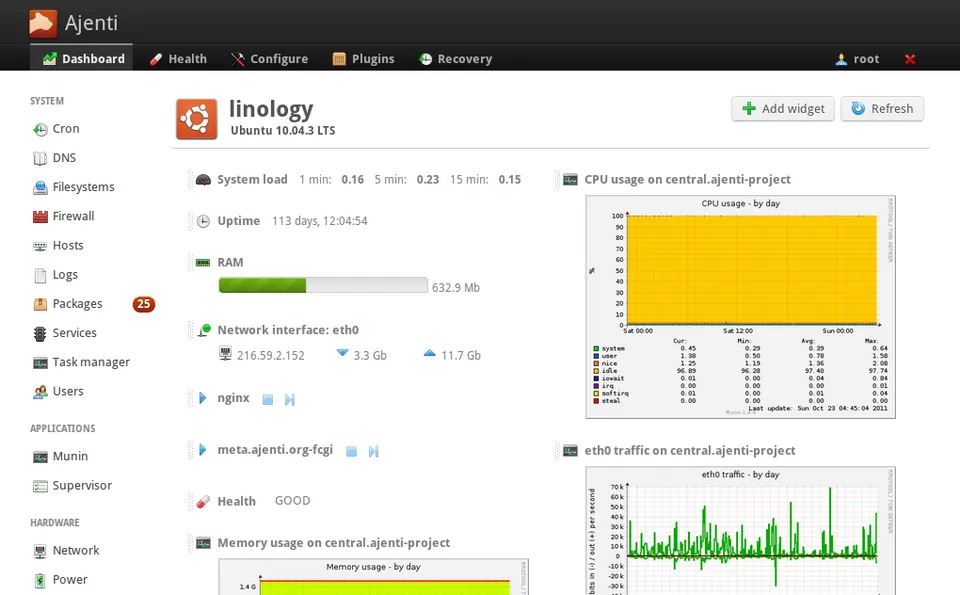
This image is kept for customers already running it. For new deployments, take a look at the active AMIs in the catalog. Read the future updates section before you decide.
Description #
Ajenti is a straightforward, lightweight and remarkably efficient server control panel. Together with the Ajenti V plugin it gives you a shared-hosting management environment that is simple to use, secure and fast.
This AMI ships Ajenti V1 and Ajenti-V installed and configured on Ubuntu 18.04 LTS, with the classic web stack already tuned: nothing to install by hand, no server parameters to guess.
Features #
Some of the most notable features of Ajenti and Ajenti V:
- Simplified configuration of application servers, databases, routes and more.
- Support for PHP (PHP-FPM), Python (WSGI), Ruby (Puma and Unicorn) and Node.js.
- Mail with Exim 4 and Courier IMAP, including virtual mailboxes, DKIM, DMARC and SPF.
- CLI interface for management, deployments and continuous integration.
What our AMI adds
- AMI based on Ubuntu Bionic Beaver (18.04 LTS).
- Latest stable release of Ajenti v1 (version 1.2.23.13).
- Latest stable release of Ajenti V installed.
- Tuned with: nginx, PHP 7.2, MariaDB server and the Ajenti repository.
Installation #
Installation follows the normal process of creating an EC2 instance. The recommended instance size is c5.large.
The security group usually includes the following rules:
| Type | Protocol | Ports | Source |
|---|---|---|---|
| Custom TCP rule | TCP | 20–21 | 0.0.0.0/0 |
| (*) SSH | TCP | 22 | 0.0.0.0/0 |
| SMTP | TCP | 25 | 0.0.0.0/0 |
| DNS | UDP | 53 | 0.0.0.0/0 |
| HTTP | TCP | 80 | 0.0.0.0/0 |
| POP3 | TCP | 110 | 0.0.0.0/0 |
| NTP | UDP | 123 | 0.0.0.0/0 |
| IMAP | TCP | 143 | 0.0.0.0/0 |
| (*) HTTPS | HTTPS | 443 | 0.0.0.0/0 |
| MySQL | TCP | 3306 | 0.0.0.0/0 |
| (*) Custom TCP rule | TCP | 8000 | 0.0.0.0/0 |
| Custom TCP rule | TCP | 12000–12100 | 0.0.0.0/0 |
The rules marked with (*) are essential, either to reach the web interface or for normal server operation. Although the example uses 0.0.0.0/0, we recommend restricting access to your own networks or a bastion host.
Once the instance is running, you can log in with:
- SSH: using the
.pemkey you selected when launching the instance. - HTTPS: at
https://ajenti.instance.ip:8000, with userrootand, as the password, the ID of the instance you have just created.
Publications policy #
Please read the Future updates section carefully.
To guarantee the stability and security of the software, Ajenti V1 is shipped with the Ajenti V module preinstalled and configured.
New versions are published periodically to keep software and security updates coming.
Future updates #
For several years now the Ajenti hosting module (ajenti-v) has received neither support nor updates. Ajenti version 1 has not been updated in over a year either, since current development focuses on Ajenti version 2.
That makes supporting this AMI difficult, and it is why we stay on Ubuntu 18.04 rather than migrating to a newer release.
Version 3.0 fixed a serious certificate problem that prevented access to the admin area. We will keep supporting this product for as long as it is feasible for us.
In the same way, once the ajenti-v module is released for Ajenti version 2, we will build a new AMI version with it.
Either way, if you have any questions, get in touch and we will be glad to help.
Support #
Using our Ajenti AMI includes support for:
- AMI installation.
- Initial configuration.
- Additional AMI-related configuration (Let’s Encrypt support, for example).
- Ajenti configuration aspects that may be related to the AMI.
- Basic general Ajenti support.
- AMI updates and migrations.
Changelog #
AMI history. Dates are the publication date of each version on AWS Marketplace.
Version 3.0
Full update of the Ajenti core and every Ajenti V module.
Version 2.1
Full update of Ajenti and the Ajenti V modules.
Version 2.0
Full update of the operating system, the Ajenti core and the Ajenti V modules.
Version 1.0
Our first Ajenti AMI, with Ajenti and Ajenti V installed and configured.
Need help with this AMI?
You get an answer from the same team that builds the image — real engineers, no bots, no first-line triage.